

Building my blog, part 1: writing without running a backend
From Akita's example to a Hugo blog with its own identity, content stored in files, and a static publishing workflow.
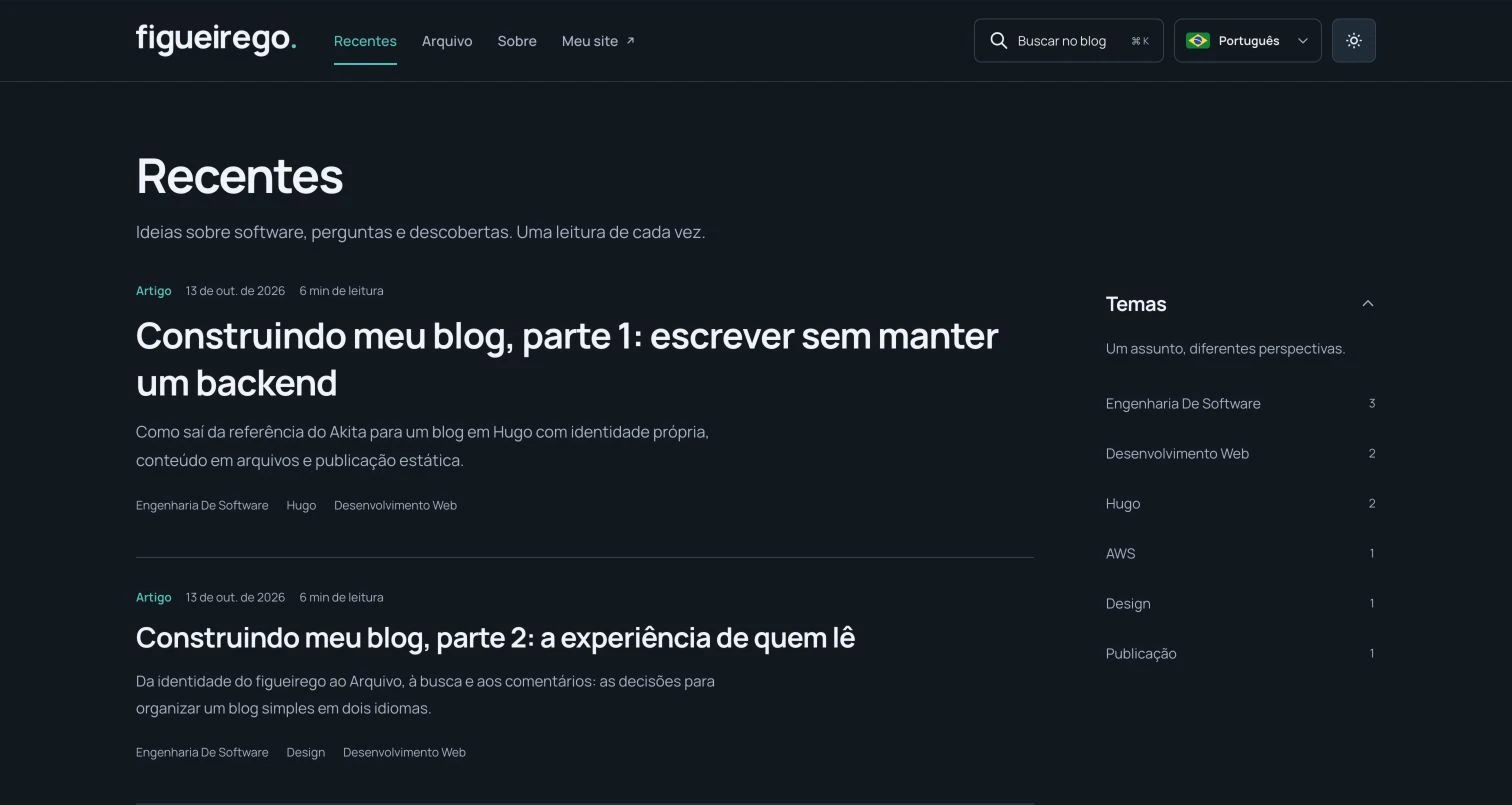
This blog starts with text files. Hugo reads those files, applies the layouts, and generates the pages delivered to the browser. I do not need to run a publishing API or my own database to serve the articles.
That was the main requirement when I started: I wanted somewhere to explain what I build, record decisions, and return to them later. I also wanted it to carry the figueirego identity, feel comfortable on a phone, and support reading in Portuguese or English.
Between the first reference and the published version, I had to make decisions about design, navigation, comments, search, hosting, and images. I split the story into three parts so that each responsibility has room for a proper explanation:
- Architecture: why I chose this foundation and what each component does.
- The reading experience: organization, languages, search, themes, and comments.
- Publishing and operations: from Markdown to the live website, including images and analytics.
Akita was the reference; the result needed to be mine
The starting point was Fabio Akita’s Meu Novo Blog — Como Eu Fiz. What interested me was his choice to publish Markdown files as a static site and reduce the work involved in maintaining a custom blog engine. The priority was being able to write.
I liked the technical approach, but wanted a different visual direction: my website’s colors, my brand, and an organization suited to the content I intend to produce. Separating those decisions helped. Choosing Hugo did not require reproducing another blog’s appearance.
I also had to clear up the names early on: Hugo is the generator; Hextra is the theme. Hugo is written in Go. Hextra provides layouts and features to build on. The Hextra repository documents that relationship.
What happens when someone opens an article
The page has already been generated when the reader arrives. The host serves HTML, CSS, JavaScript, and the necessary assets. There is no query to my own database to assemble the article on every request.
The main path looks like this:
Markdown text + metadata + layouts
                ↓
               Hugo
                ↓
           static pages
                ↓
            Hostinger
                ↓
         reader's browser
This still leaves room for interaction. Search runs in the browser, filters respond to clicks, the theme changes, and comments come from an external service. The useful distinction is what I need to operate: the main content does not depend on an application server of my own staying online.
I chose this structure because it fits the kind of publishing I want to do. I am not building a platform with its own reader accounts, subscription billing, or simultaneous browser editing. If those needs arise, they will deserve a separate decision.
A clear job for each tool
The implementation ended up with these responsibilities:
| Component | Its job in this blog |
|---|---|
| Markdown | Store articles and their metadata. |
| Hugo + Hextra | Generate pages and provide the visual and functional foundation. |
| Custom layouts, CSS, and JavaScript | Apply the figueirego identity and specific interactions. |
| Private GitHub repository | Version the source and run checks and builds. |
| Hostinger | Serve the static site at its public URL. |
| Amazon S3 | Store images uploaded separately from the site. |
| Disqus | Host comments and their moderation. |
| GoatCounter | Record visits used to generate the most-read lists. |
An important decision was to use the hosting I already had. I considered other destinations, but the blog was published on Hostinger. AWS handles images, not page hosting. There is no CloudFront distribution in this workflow.
The source files remain in a private repository. Readers receive the published output and do not need repository access. That does not make files served by the site private: articles, images, HTML, and JavaScript delivered to a browser are public.
The theme is a foundation I can customize
For this first version, I pinned Hugo Extended 0.167.0 and Hextra 0.13.0. The theme is included in the repository. Building this project with the installed Hugo binary does not require installing Go or running a local npm build.
Customizations live separately from the theme directory:
content/          Portuguese and English content
layouts/          custom pages and components
assets/           styles, search, and interactions
static/           fonts, brand assets, and local images
i18n/             interface messages
themes/hextra/    the underlying theme
scripts/          upload and validation helpers
This separation makes problems easier to locate. Incorrect article text belongs in content/. An English button label belongs in i18n/. Spacing or contrast belongs in the styles. A comment-service change belongs in that integration.
A future theme update will still require review. Keeping these files separate makes the work easier to understand; it does not guarantee automatic compatibility with every new release.
Where do I actually write?
That was one of my questions during the build. There is no administration tab inside the blog where I sign in and start typing. Editing happens on my computer, in Markdown files, using a text or code editor.
Each publication begins with metadata: title, date, summary, topics, and draft status. The text follows. The content remains editable without opening a particular editing service, and Git records the changes I choose to commit.
For review, I use Hugo’s local preview. It renders the actual layout and can include drafts. Publishing is a separate step: submit the reviewed content, generate the production version, and check the live website. The full commands are in part 3.
Akita’s article about Docker also informed that investigation. Docker provides a local environment for contributing to his repository. Running that copy does not automatically publish to his site; contributions go through pull requests. My current workflow runs Hugo locally without making Docker a requirement.
Languages became part of the structure early
I wanted English at the domain root and Portuguese under /pt/. That became a content decision: each language has its own files, connected through a stable translation key.
Akita’s account of translating his archive was another reference. In my case, I am starting with pairs of articles rather than migrating a historical archive. The language control navigates between prepared versions; it does not call a translator on every click.
That puts review inside the editorial process. Titles, explanations, and examples need to make sense in both languages. The infrastructure connects the files, but it cannot decide whether a translation reads well.
Building with AI still required checking the result
I used Codex to help turn decisions into code, review behavior, and organize this series. To show the result, this series uses actual screenshots, with captions identifying their context. The process involved previews, screenshots, requests for changes, and checks of the site actually being served.
Some corrections came directly from using it: the search button that did not open as expected, comments split between languages, and excessive spacing in the footer. Choosing an appropriate technology alone would not have resolved any of them.
The build also included proposals for a newsletter and more menu sections. The newsletter was left out for now, and content formats were gathered inside the Archive. Having the ability to implement something did not mean it had to enter the first release.
The next step is to use this structure to write. To see how it works for someone arriving at the blog, continue to part 2: the reading experience.
Building my blog: 1. Architecture · 2. The reading experience · 3. Publishing and operations.
Comments
Continue the conversation on Disqus.
The blog theme changed. Send or copy any draft before refreshing the comments.