

Building my blog, part 3: from Markdown to publishing
My workflow for writing, translating, publishing on Hostinger, uploading images to S3, and updating the most-read list without maintaining my own backend.
Editorial note: This series documents the initial Hugo blog, which was separate from the portfolio. The unified version of the site brings both together at figueirego.com, with the blog under
/blog/(English) and/pt/blog/(Portuguese). The commands, screenshots, andmain→published→blog.figueirego.comworkflow below belong to the standalone version; they do not describe publishing the unified site.
The file containing this article lives in content/en/posts/. Its Portuguese version lives in content/pt/posts/. To publish, I review both, generate the site, check the output, and push the changes to GitHub. The hosting platform receives finished pages.
That was the experience I wanted: being able to write without looking after a publishing application running around the clock. There are still tools and services involved. The difference is knowing what each one does and keeping the path between the text and its reader short.
This is the third part of building the blog. In part one, I explained the architecture; in part two, the reading and navigation decisions. Here, I’ll walk through publishing from start to finish.
The editor works on a file on my computer
I write Markdown in a code editor. To start an article, I use the template already in the repository:
hugo new content content/pt/posts/meu-artigo.md --kind default
hugo new content content/en/posts/my-article.md --kind default
Both files start as drafts. The header, called front matter, holds the information the layout needs. Here is a shortened example following this project’s conventions:
---
title: "How I published my blog"
date: 2026-10-13T09:00:00-03:00
draft: true
sample: false
author: "Matheus Figueirêdo"
translationKey: "how-i-published-my-blog"
description: "From writing in Markdown to publishing."
summary: "The decisions and workflow behind putting the blog online."
tags: ["software engineering", "Hugo"]
image: "/images/my-cover.webp"
imageAlt: "The blog Archive, with publications organized by year."
imageCaption: "Screenshot of the local Archive preview."
imageWidth: 1512
imageHeight: 805
---
The title, summary, and body change in the translation. The translationKey stays the same, even when the filenames differ. That is how I connect the two versions. The language selector finds an existing translation; it does not translate the article itself. This use of the key follows Hugo’s front matter documentation.
Dimensions must match the actual image. A cover is optional: a short note may work better as text alone. To insert an image into the body, I use the usual syntax:
Saving, previewing, and publishing are different steps
While writing, I start the preview:
hugo server --buildDrafts --bind 127.0.0.1The local address lets me review the text, images, and both languages. --buildDrafts includes drafts in this preview. Saving updates the preview; none of this puts the article on the internet.
For the standalone version, before publishing, I changed draft to false and checked the output with this production configuration:
python3 -m unittest discover -s tests -v

hugo --config hugo.yaml,hugo.production.yaml \
  --environment production --minify --panicOnWarning \
  --cleanDestinationDir \
  --baseURL https://blog.figueirego.com/

python3 scripts/check-site.py public \
  --production-url https://blog.figueirego.com/
Tests cover the project’s behavior; the checker inspects the generated HTML, local links, translations, feeds, and publication metadata. The production configuration also removes the indexing restrictions used in the preview. Building only the local version and copying its files could carry those restrictions onto the public site.
Tests do not replace reading. I still need to check whether the cover fits the text, whether the translation sounds natural, and whether the examples make sense.
GitHub delivers; Hostinger serves the pages
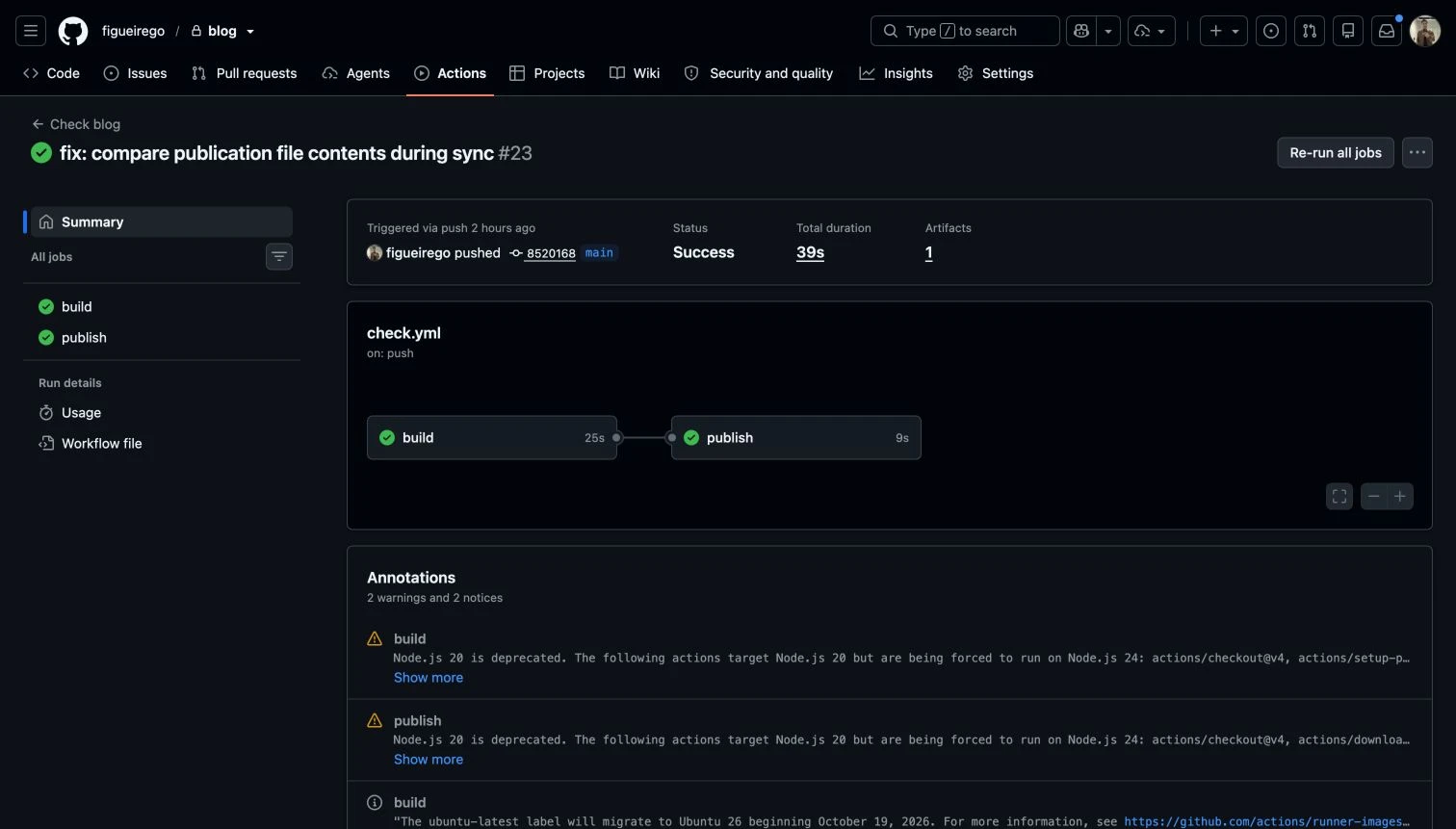
In that version, after reviewing, I pushed the content files and any required local images to main. The workflow repeated the tests, ran Hugo, and prepared the published branch with the output.
The publishing path for the standalone blog looked like this:
Markdown and local images
        ↓
GitHub: main
        ↓
tests + Hugo + generated-file checks
        ↓
GitHub: published
        ↓
Hostinger → blog.figueirego.com
The source remains separate from the files being served. I do not edit published manually because the workflow generates its contents.
That branch includes a minimal package.json for compatibility with Hostinger’s preset. It has no dependencies, and its build command only checks that public/index.html exists. Hugo has already run on GitHub; the hosting platform receives finished HTML, CSS, JavaScript, and assets. I do not need to maintain my own application server or database to deliver the articles.
A publication is confirmed only after checking three things: the GitHub checks, the corresponding deployment in Hostinger, and the page on the live website. A green workflow proves that execution succeeded; it does not, by itself, prove which version a reader received.
Images can travel with the site or live in S3
AWS joined the setup as image storage. The pages remain on Hostinger. A file in static/images/ goes with the build; an image in S3 is uploaded separately and referenced by its public URL.
I do not need to move every image to AWS to use the blog. I can publish a local cover with its article and use S3 when I want a file outside the site’s package. The build does not upload images automatically.
For uploads, I configured a dedicated IAM user with permissions limited to the bucket’s image prefix. It uses passkey MFA and temporary AWS CLI authentication, without a permanent access key inside the project. AWS documents this browser-based sign-in flow.
The upload script lets me inspect the destination before sending anything. The names below are examples; they must be replaced with the values of an environment that has already been configured:
aws login --profile my-blog --region us-east-1

python3 scripts/upload-image.py /path/to/cover.webp \
  --bucket my-image-bucket \
  --base-url https://my-image-bucket.s3.us-east-1.amazonaws.com \
  --profile my-blog \
  --prefix images \
  --dry-run
--dry-run validates the file and shows a possible destination, but uploads nothing and does not confirm public access. To upload, I repeat the script command without that option. Each execution generates a new key; the simulated URL will not be the final URL.
After uploading, I open the returned URL without an AWS session and check the image. The script does not make a private bucket public: read access must already be configured. In my workflow, published images use HTTPS without a temporary signature, so the address does not expire with a session.
Uploads use long-lived caching with immutable and unique filenames. If I correct an image, I upload another file and update its URL in the text. The previous version remains in the bucket until removed. There is also a cost alert: it reports spending but does not enforce a cap or shut resources down. A simple blog is not a promise of a zero-dollar bill.
“Most read” without fetching statistics on every visit
GoatCounter records visits, and GitHub fetches those statistics during publication and through a scheduled daily run. The result becomes a static list included in the homepage.
The token has permission to read statistics and lives in a GitHub secret, available to the step responsible for that request. It does not enter the reader’s JavaScript. The browser runs the public counting script; the ranking is assembled before the page is served. Authentication follows the GoatCounter API.
The filters have precise meanings:
- Week: the seven complete days before the update, in UTC.
- Month: the thirty complete days before the update, in UTC.
These are rolling windows, not calendar weeks or months. The current day is excluded because it is incomplete. The list updates daily, with no promise of real-time results.
Visits to Portuguese and English versions are combined using translationKey; links and titles appear in the reader’s language. The number represents recorded visits, not a guarantee of completed reading or unique people across languages. Blockers can also prevent collection.
If a request fails, I preserve that period’s last valid result with its original timestamp. Without valid data, I do not invent numbers: the list stays empty, and the section remains hidden when neither period has content.
The routine after launch
Comments live in Disqus and need moderation. RSS includes eligible publications in each language and offers a way to follow the blog. The newsletter is out of scope for now.
Delegating these functions reduces what I operate, but leaves dependencies: hosting, storage, comments, and statistics can fail or change their terms. The text and its publication remain grounded in versioned files.
For the next article, my routine is concrete: write, review the translation, prepare the cover, check the preview, run the checks, push the changes, and open the published page. Then respond to comments and fix anything that needs it. The infrastructure has to leave room for that work.
In this series: 1. Architecture · 2. Reading and navigation · 3. Publishing.
Comments
Continue the conversation on Disqus.
The blog theme changed. Send or copy any draft before refreshing the comments.